Thursday, July 5, 2012

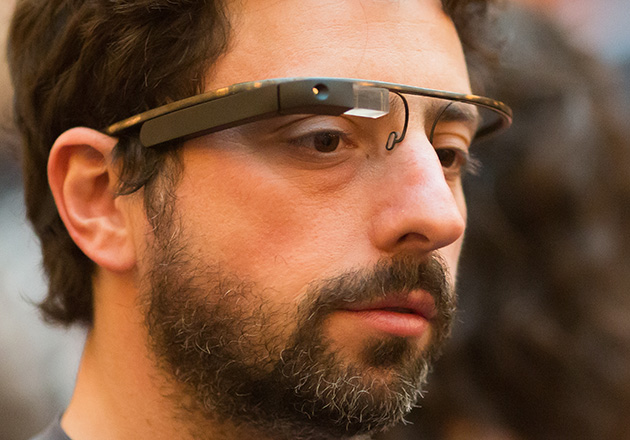
Apple gain 'iGlass' patent to rival 'Google Glass'

The device would be similar to Google's Glass project in many ways - it would allow the user to view apps, content, videos, photos, and more, all in real time while wearing the device.


The technology in both projects involves LCD projectors, and is widely expected to become a serious reality within the next 5 years. The patent Apple gained involves a 'method in which the image travels through a special glass to land directly into the user's pupils'.


Just like both companies have been competing with their mobile operating systems Android and iOS, the two companies could soon be going head-to-head with these futuristic products.

Apple finally lose a lawsuit - 'swipe to unlock' feature

Taiwanese mobile giant HTC have beaten apple in England's courts in a case where they challenged the European patents held by Apple protecting the pervasive iOS 'swipe to unlock' feature.


This feature is on every iPhone, while companies like HTC, who predominantly create Android and Windows phone based devices, can have a similar unlock feature to unlock their handsets. Having had a HTC before, their 'Arc' unlock is the challenge in question. It is a lot like the iOS swipe to unlock, only it is vertical.

It was decided in the courts this week that HTC would have infringed on the Apple patents, but did not due to one factor, a device released 8 years ago called the 'Neonode N1' which, amazingly, had a 'right sweep to unlock feature'.

It's not often you see Apple lose in the courtroom, but I have to say I am happy for HTC, they have been such an innovative company lately, with their One X being a beautiful phone and miles ahead of the competition. They issued a brilliant statement, highlighting what the smartphone industry is like right now: "HTC is pleased with the ruling, which provides further confirmation that Apple's claims against HTC are without merit. We remain disappointed that Apple continues to favour competition in the courtroom over competition in the marketplace."

Wednesday, July 4, 2012

Charge your smart-phone with your t-shirt?

Engineers in the University of North Carolina have been conducting, excuse the pun, research on a modified piece of clothing, i.e. a t-shirt, changing it into highly conductive and flexible activated carbon textiles (ACTs) for energy-storage applications.

They bought a random cotton t-shirt, added some chemicals and stuck it in the oven (yes, seriously!). Using their chemical wizadry, they created a stable, high-performing supercapacitor, storing an electric charge and capable of charging and discharging a lot of times, with enough power to easily charge a smart phone device numerous times.


Here is a link to the official abstract of their research. I love hearing about research like this, it's the technology of the future, in the making...

Jelly Bean: An unlikely named Siri-killer!

So android Jelly Bean is out, the latest version of Google's Android mobile OS. From initial reports, this version is faster, slicker and probably better than any other mobile OS out there, including iOS and Siri voice control.


I am not an android user, but some of my friends are and I have to admit, it looks impressive, having seen it in action, specifically the Google Voice vs Siri comparisons, here is one below, check it out for yourself!


Thursday, June 28, 2012

Why Windows 8 OS will have no 'Start' button

Microsoft program manager Chaitanya Sareen explains:

"We'd seen the trend in Windows 7. When we evolved the taskbar we saw awesome adoption of pinning [applications] on the taskbar. We are seeing people pin like crazy. And so we saw the Start menu usage dramatically dropping, and that gave us an option...

"So I'm a desktop user, I pin the browser, Explorer, whatever my apps are. I don't go the Start menu as often. If you're going to the Start screen now, we're going to unlock a whole new set of scenarios, or you can choose not to go there, stay in the desktop, and it's still fast. You can't beat the taskbar."

Having been a mac-head, I used to keep my OS updated with the latest beta and developer releases of OSX and iOS, so when I heard about the Windows 8 consumer preview I installed it straight away.


Having been running it for a few months now, I have to admit, it is very smart, and just like the Windows phone OS, it is very stylish but a little more complicated to get used to, but there is definitely a good reason to leave the start button out and once you get adjusted to that fact.


As you can see from the photos, there are so many new options that more than make up for the start button and that also make every app and system command more accessible.
Windows 8 is a very nice and intuitive operating system. The full version, coming this July, should be very popular.

Monday, June 25, 2012

Ex-Facebook developers create faster rival to MySQL

Eric Frenkiel and Nikita Shamgunov have created MemSQL, a database which they claim is the fastest in the world.

They performed a test which shows that MemSQL can facilitate circa 80,000 queries per second while MySQL can facilitate only 3,500 queries per second. The video of the test can be seen here.

The reason it is so fast is in the name, MemSQL keeps all data in the memory, allowing for it to perform much faster than other databases.

Here is the official website: http://memsql.com/, "The world's fastest database", "30 times faster than MySQL". Very interesting stuff as I am currently learning MySQL in college, and I wonder will MemSQL be the tool that students are learning next year...

Wednesday, June 20, 2012

JavaScript: what is it?

Javascript (also known as the abbreviated JS) is a dynamic scripting language used on the web for things such as validating email address/forms and adding functionality to web pages.

I use Chrome mostly, but there is a nifty little app called Firebug (download at http://getfirebug.com/) which allows you to edit javascript and run it, through the Firefox browser. You can also view and edit html, css, etc.

Below is a helpful video tutorial on how to get to grips with using Firebug and Javascript:


Here is the most simple of all 'programs' you can create using JS, just like with Ruby:

alert("Hello world!");

When you type that into Firebug and hit 'Run' you will get the following:


Sunday, June 17, 2012

Schema

Ever heard of schema.org?


Probably not. I have been dabbling in web design for over 5 years now, and I only just found out about it. Essentially, it is a site that offers a collection of html tags, that major search companies like Google will be able to recognise and index easily, so that your site content achieves maximum SEO.

Thursday, June 14, 2012

Thunderbolt - so what is it?

If you are a fan of technology, in the sense that you have an idea of what a Macbook Pro or iOS is, you will have heard of Thunderboat.

Introduced in 2011 it is now standard on all Apple macbooks. Ok ok, so what is it? It is a 'peripheral connection' technology that allows both data and power to share a single connection, all of course, under high speeds, much higher than USB 3.0 or even Firewire.


Each Thunderbolt port has two channels, each of which can provide data transfer of up to 10 Gigabits per second. It's almost too fast!

Wednesday, June 13, 2012

iOS 6, Apple... and Windows Phone!

So iOS 6 has been announced, here is a clever video highlighting 25 UI (User Interface) changes in it (many of which are very subtle):


It doesn't look anything special to me, and I much prefer my current OS of Windows Phone, with it's slick metro interface.

Having been an Apple 'fanatic' for years, I changed my tune late last year, primarily because of the death of Steve Jobs, and the release of the iPhone 4S.

I remember having a Macbook in 2004, when they were a rare entity. I then had a Macbook Pro and finally switched to an iMac. I jumped on the iPhone bandwagon when the 3GS came out, then I had the iPhone 4. I even begain iOS app development, and had some popular apps - 'Word File' and 'Fact File' and also 'Recreational Grief'. Late last year I sold my iMac and iPhone and switched to a windows laptop and windows phone (Nokia Lumia 800)!

Apple make beautiful products, and products that bode well for people in the areas of graphic design, music and video production, but my opinion is that they have stagnated in terms of innovation since last year, and I was so saddened by the death of Jobs, coupled with the fact that the 4S was such a let-down to me, that I jumped ship.

Nokia Lumia 800 white (my current phone)

The Lumia is a beautifully-designed phone - which for me has become such an important aspect to phones - now that they all come as standard with high-end chips, memory and processing capacity. The metro UI of the windows phone OS is also a very slick and appealing interface to me. I opted not to get the 4S, the most obvious reason being that it is an outdated design (3 years old).

I will be interested to see what the new iPhone 5 will look like, and will Apple be able to 'innovate' in order to make it appealing enough to buy. For now, I will stick with Windows, until Apple regains it's momentum of old and starts innovating once again rather than lagging behind (which is what it is doing right now in the phone market, hint: think Samsung Galaxy S3 or HTC One X).

Friday, June 8, 2012

HTML5: A brief introduction

HTML5 is the latest version of the markup language used to create web pages. It offers, among other things, some new elements for inserting media easily into a web page, such as the <audio> and <video> tags.


The <!DOCTYPE> declaration, required at the top of every web page, has also been simplified. Whereas before it required a reference to a DTD (document type definition), now you simply type <!DOCTYPE html> and proceed to type your <html> and <body> tags, it is that simple!

Here is a brief example of how to insert an audio track, just type this code into the body:

<audio controls="controls">
<source src="trackname.mp3" type="audio/mp3" />
</audio>


This is what it will look like (above), and as you can see, the 'controls' attribute is also new in HML5, and it basically displays a play/pause and volume button on the track player so the user can control the song.


Another cool addition is the <base> tag. You put it inside the <head> element and it is used to specify the base URL for all relevant URL's in the html document (for example; images):

<head>
<base href="http://www.example_site.com/images/" target="_blank" />
</head>

<body>
<img src="example_image.png" alt="Sample image" />
</body>

As you can see above, when inserting an image into the code, the base tag already tells the browser where all elements are located so you just specify the file name without the long URL description.


More on HTML5 soon!

Tuesday, June 5, 2012

GitHub Basics for noobs (like me): Part 1

GitHub is basically a website that offers software programmers a method whereby they can save their files at certain times, so that if any mistakes are made, they can go back to a previous version of the program and change it. It allows multiple users to work on and update a project, so people can work separately on the same project, which is kind of cool.

So whenever you make a change to a project, you have to 'commit' it through the Git Bash program.

I am going to do a step-by-step guide to setting up a basic Git repository (a Git repository is a place where all the commits will be stored). Firstly, open Git Bash and type the following:

$ mkdir example
$ cd example

This creates a directory on your computer. To initialize this as a Git repository, type:

$ git init

We can then add files into the directory using the touch command (a readme file is generally what you will put in first):

$ touch README.md
$ touch sample1.txt sample2.txt

This creates two blank text files in the repo (sample1 and sample2). We can commit now:

$ git add --all
$ git commit -m "Commit #1"

We have created sample1 and sample2, now if we want to create more samples, this brings in the 'branch' factor. To create a new branch (called 'lumia' type:

$ git checkout -b lumia
Then, to add another sample file:
$ touch sample3.txt
$ touch sample4.md

Type in:
$ git status -sb
This will return the two newly created files (sample3.txt and sample4.md) which are located in the branch we are using. You don't have to commit both of the files, you could choose to only commit one as follows:
$ git add sample3.txt
Now just the sample3.txt has been added and sample4.md has not been added. If there were a few files that you wanted to add, and they all ended in the same format, ie. .txt, then you could type in:
$ git add *.txt

That add all of the .txt files that you created. Now, if you check the status again, only the remaining file sample4.md will be displayed as 'untracked'. So now we can commit the files we are happy with:
$ git commit -m "Add sample text file"
(Apparently when you leave a comment, it is best to use the present tense (-_-). So that is our three sample.txt files committed! We can create a new branch and put the sample4.md file into it. (MD by the way, is 'markdown' language, it is basically another form of text file, primarily used in programming, because it is easy to read and write to):
$ git checkout -b branchtwo
Git will tell us that it switched to a new branch 'branchtwo' (or whatever you want to name it). To add our sample4.md file from the other branch, simply type the following and then check the status to make sure the file was moved to the new branch, and then finally commit:
$ git add sample4.md
$ git status -sb
$ git commit -m "Add sample markdown file"
To list all branches, type:
$ git branch
To switch between branches, use the checkout command again, and then use the list command to list all the files in that branch:
$ git checkout lumia
$ ls -1
You may have noticed that when you listed the branches, there was a 'master' branch in the list. This is created by default, and I guess it could be called the tree. To merge the 'master' branch and the 'lumia' branch, we can type the following:
$ git checkout master
$ git merge lumia
Now they are merged and the lumia branch can be deleted as follows, and then confirmed by listing the branches:
$ git branch -d lumia
$ git branch
So now we have only the master branch, and the 'branchtwo' branch. Each time you use the 'checkout' command to change branch, if you keep the folder of the directory open on screen, you will see the files change in real time! That is all for Part 1, I will post the follow up in the coming days...

Sunday, June 3, 2012

jQuery: what is it!?

It is a cross-browser, JavaScript library that makes it easier to code, implement and develop JavaScript in your web projects.

A basic example would be when you want a script to run when a web page is loaded (window.onload). Using existing JavaScript, the page itself could take a while depending on how long it takes for images, content, and banner ads to load and so the script could run prior to content being ready.

By using jQuery, you can use the (document).ready function, thus allowing for all content to be loaded, and once the page is ready, then running the script. jQuery is also very popular for creating 'lightbox' effects on images and image galleries, and countless other nifty uses.

jQuery essentially offers a modern way of implementing and expanding upon JavaScript, and is a handy tool for the web developer who wishes to make slick-looking sites with code that works efficiently.

Sunday, May 27, 2012

What is the 'ruby' programming language?

Ruby is an object-oriented programming language, designed in the late 1990's by a Japanese guy known as 'Matz', with the aim being to make a simple to use, yet powerful programming language. He seems like a nice guy, he was quoted recently as saying that he wanted "every programmer in the world to be productive, and to enjoy programming". Sorry I just had to put enjoy in italics!

As of the past few weeks, I am completely new to the web programming world of Ruby and was definitely apprehensive prior to starting my course in web technologies, however having said that, Ruby does indeed seem to be quite approachable in terms of being able to understand it and to learn it relatively easily.

To install Ruby, simply click here to download for free. Once installed, it can be simply run by opening the command prompt (Click 'run' then type in 'cmd' and hit enter. Alternatively, you can try Ruby in a web browser by clicking here in a series of progressively harder sample tutorials. This is a great way of seeing exactly what it is if you are new to the concept of programming or the ruby application.

The most simple piece of code is the 'hello world' application. Once the command prompt is open, type in  irb and hit enter. This is an interactive command-line interpreter and allows us to test ruby directly in the command prompt, rather than saving our code as a .rb file and then running it from the command prompt. So enter irb, and then type in puts "hello world" and hit enter. The command prompt will then return the following:

Hello, World
=> nil

So that is a basic program believe it or not! Here is a basic piece of code from the official Ruby site:


# This is an ignored comment

cities  = %w[ London

              Oslo
              Paris
              Amsterdam
Berlin ]
visited = %w[Berlin Oslo]
     "to visit the " +
     "following cities:",
     cities - visited


If you copy and paste the above text into the command prompt, it will return the following:


I still need to visit the following cities:
London
Paris
Amsterdam
=> nil

Here is my explanation of the code:
  • The hash (#) key tells ruby that the text that follows it on that line is like a comment, ie. it is not part of the code so ruby will ignore it.
  • The "cities =" is just creating a group of cities.
  • The "visited=" is creating a group from the cities listed that we have visited.
  • Then the "puts" command is telling ruby to return the text in quotes, but to return the 'cities - visited' i.e. to return the cities listed but not the ones we have visited, hence why the visited cities are missing from the output!
That is a very basic introduction into the ruby programming language!